Orange Everyday
Set up PayID
Have you set up Pay ID yet? If your Pay ID was set up with your old card you won’t need to do anything. If you haven’t set Pay ID up before let’s do it now! Send or receive money with PayID pronto! PayID lets you use a mobile phone number or email address, instead of an account number, to transfer money. Here’s how:
In the ING mobile app
- Login to your ING app and tap More > Settings > PayID
- To register your PayID, tap Create PayID (Note: customers with no eligible PayID’s to register will not see the button).
- Choose the mobile number you want to register with, and the account you wish to link it to.
- Read and select agree to the terms and conditions, then tap Continue.
- Enter the Security Code verification sent to your registered mobile number – then you’re done!
Tip: If your chosen mobile number or email is already registered with another bank, you’ll need to contact them to de-register your details. You can have multiple PayIDs, but each individual PayID (for example, your mobile phone number) can only be linked to one account.
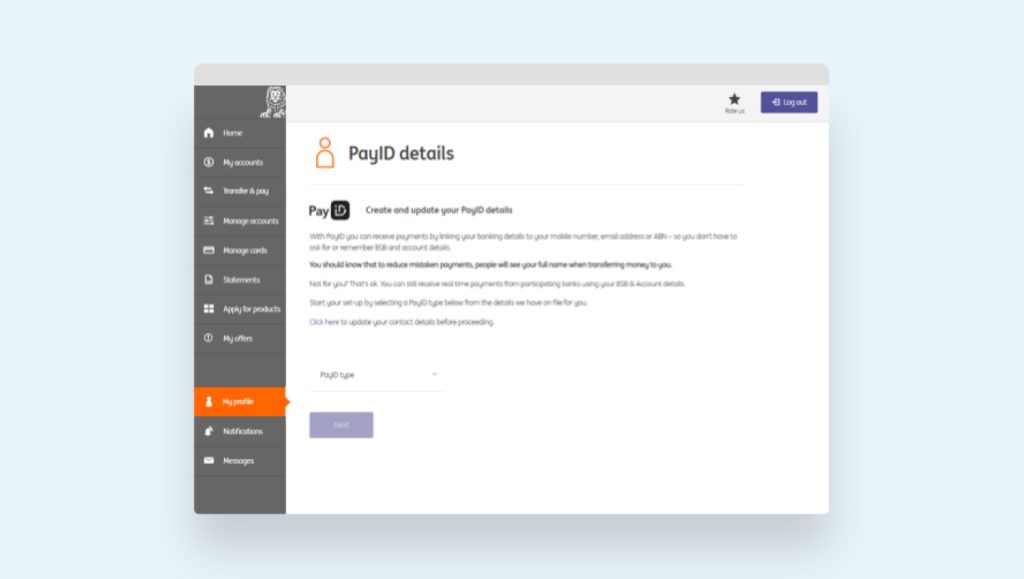
From online banking
- Go to My profile
- Follow to PayID details
- Select the account you want to link your email address or mobile phone number – you’re done!
 Activate your card
  PIN set up
  Staying secure
  Update payment details
  Set up PayID
  Set up your mobile wallet
 Everyday benefits
  Tips and Tricks
  Frequently Asked Questions