Orange Everyday
Tips and tricks
Set up notifications
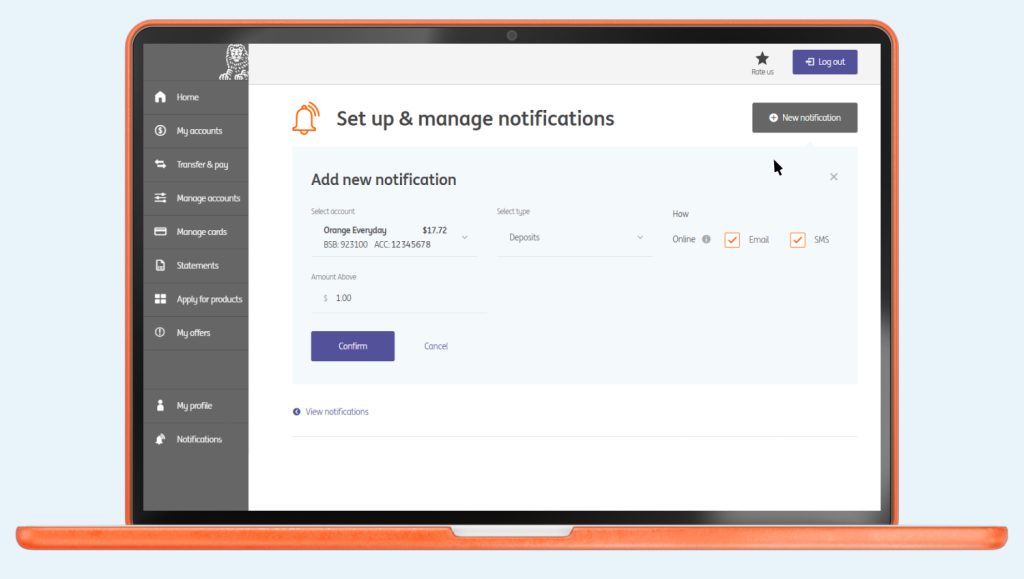
Set up account alerts to track money coming in, money going out, when you make purchases or when your balance rises above or below a certain amount. Pretty handy, huh?
In online banking
- Go to Notifications > Manage notifications and follow the prompts.
Once you’ve turned on notifications, you’ll know instantly when a deposit, like your salary, lands in your account or when your balance drops below your budget.
You can change your notifications at any time.
Account controls
In the ING app, click on the account you would like to view, and click ‘Manage’ to access your account settings.
- Under Cards > Card settings you can:
- View your card details
- Change your card PIN
- Report a lost or stolen card
- Replace a damaged card
- Put a temporary hold on your card
- View stored card details
- Access ING Pocket Perks
Track your savings
If you have a Savings Booster or Savings Maximiser, you can track any interest earned on your savings in the Interest tab of the ING mobile app. See if you’re close to meeting the eligibility for our highest variable rate for the month, as well as see all interest earned in the financial year to date.
Everyday Round Up
If you have a Savings Booster or Savings Maximiser, you can actually save while you spend by using Everyday Round Up. You heard right. Just choose to round up your card purchases to the nearest $1 or $5 and we’ll automatically transfer the difference from your Orange Everyday into your Savings Booster or Savings Maximiser account. Magic!
In the ING app
- Login to ING app
- Tap More > Settings > Everyday round up
See the list of merchants
With the ING app, you can see a list of merchants that may have stored your card details.
In the ING app
- Select Cards
- Tap on the card that you would like to view
- Under Manage, tap on Stored card details
- The list of merchants that have charged your card in the previous 13 months and may have stored your card details will be visible
 Activate your card
  PIN set up
  Staying secure
  Update payment details
  Set up PayID
  Set up your mobile wallet
 Everyday benefits
  Tips and Tricks
  Frequently Asked Questions